
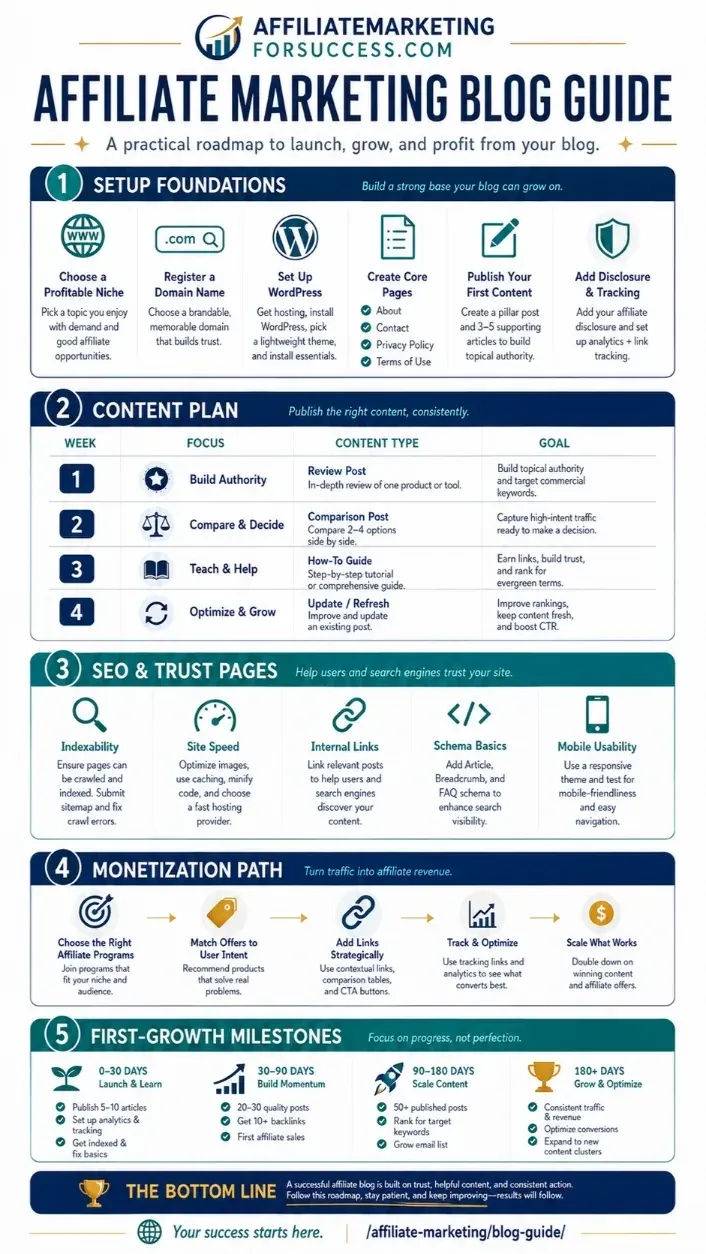
Quick Answer: Start by choosing a niche you understand, building a WordPress site with a lean tool stack, publishing 8–12 targeted pages, joining relevant affiliate programs, adding proper disclosures, and tracking clicks with Google Analytics 4. Most beginners see their first affiliate click within 60–90 days of consistent publishing.
Which path fits you? Pick one to skip ahead:
- No site yet? → Start at Step 1 below.
- Have a site but no traffic? → Jump to the Content Cluster section.
- Have traffic but no revenue? → Jump to the Affiliate Programs section.
- Have revenue but not growing? → Jump to the Monetization section.
What Affiliate Marketing Actually Is (and What It Is Not)
Affiliate marketing means earning a commission when a reader clicks your link and buys a product. You do not create the product, hold inventory, or handle customer service. You create content that connects buyers to products you genuinely recommend.
What it is not: a get-rich-quick plan. The median affiliate site earns very little in its first year. Sites that succeed share one trait — they publish useful content consistently for a specific audience, then match that content to relevant products over time.
Pick Your Starting Point
Use the table below to find your current stage and the recommended first action:
| Stage | What You Have | Recommended First Action |
|---|---|---|
| Stage 0 | No site, no content | Build site → publish 5 posts → join Amazon Associates |
| Stage 1 | Site exists, no traffic | Publish 5 SEO-focused posts → submit sitemap to GSC |
| Stage 2 | Traffic but no affiliate clicks | Add affiliate links to existing posts → add disclosures |
| Stage 3 | Affiliate clicks but no conversions | Match intent to product → test link placement |
| Stage 4 | Revenue but stagnant | Add programs beyond Amazon → build email list |
Step 1: Choose a Niche You Can Actually Write About
A niche is a specific topic area. The best affiliate niches balance three factors: your knowledge or interest, search demand from buyers, and available affiliate programs.
High-opportunity affiliate niches with proven programs:
- Personal finance (banking, investing, credit cards)
- Health and fitness (supplements, equipment, programs)
- Technology and software (SaaS tools, hosting, gadgets)
- Home improvement (tools, furniture, organizational systems)
- Pet care (food, equipment, training programs)
Avoid niches where you cannot write honestly — or where you cannot join a single affiliate program. You need at least one program before you can earn.
Step 2: Build Your WordPress Site (Lean Stack)
You need three things to launch a basic affiliate site:
- Domain name — Register at Namecheap or Cloudflare ($10–15/year).
- WordPress hosting — Managed WordPress hosting costs $10–30/month for beginners. See the best WordPress hosting for affiliate sites for platform comparisons.
- WordPress — Installed automatically by most managed hosts.
Recommended starter plugins:
- Yoast SEO or Rank Math — on-page SEO
- WP Fastest Cache or LiteSpeed Cache — site speed
- Wordfence — security
- Pretty Links or ThirstyAffiliates — affiliate link management
- SiteKit by Google — analytics in the WordPress dashboard
Step 3: Publish Your First 10 Pages
Your first content cluster should answer buyer and research questions about your niche. Structure it as:
- 3–4 informational posts (how-to, guides, explanations)
- 2–3 comparison posts (product A vs product B)
- 1–2 review posts (individual product deep dives)
- 1–2 tool or resource posts (best software, courses, or equipment)
See the affiliate content strategy hub for the full cluster-building guide.
Step 4: Join Your First Affiliate Programs
Join programs in this order of difficulty:
- Amazon Associates — Easiest to join, lowest commissions (1–10%), huge product range. Join after publishing 3 posts. Amazon Associates guide
- Affiliate networks — ShareASale, Impact, Awin. Join once you have traffic. ShareASale review
- Direct affiliate programs — Higher commissions, requires application. Join after you have 500+ monthly visitors.
Step 5: Add Proper Disclosures and Compliance
FTC regulations require you to disclose your affiliate relationships clearly. Place your disclosure:
- Above the fold on review posts
- In the first paragraph of posts containing affiliate links
- In your site-wide footer or sidebar
See the affiliate disclosure page for example wording.
Step 6: Track Clicks, Not Just Revenue
Set up Google Analytics 4 with affiliate link click tracking before you publish any affiliate links. Track:
- Which pages send the most affiliate clicks
- Which affiliate programs convert most often
- Bounce rate and time-on-page for affiliate content
- Revenue per click (RPC) by program and content type
The tracking guide covers GA4 setup step by step.
90-Day Beginner Plan
| Period | Tasks | Goal |
|---|---|---|
| Days 1–30 | Choose niche, register domain, set up hosting and WordPress, install plugins, publish 3 posts | Live site with 3 published posts |
| Days 31–60 | Publish 5 more posts, apply to Amazon Associates, add disclosures, set up GA4 | 8 posts, Amazon approved, tracking live |
| Days 61–90 | Publish 4 more posts, add affiliate links to existing content, submit sitemap to GSC | 12 posts, first affiliate clicks |
Mistakes to Avoid
- Not joining a program early enough — You cannot earn without affiliate links.
- Publishing thin content — Posts under 1,000 words rarely rank for competitive terms.
- Skipping disclosures — FTC violations carry real risk.
- Promoting products you have not used — Readers notice, and trust is hard to rebuild.
- Ignoring site speed — Slow sites lose readers and ranking potential.
Frequently Asked Questions
How much does it cost to start an affiliate marketing site?
A basic affiliate site costs $100–500 in the first year: domain registration ($10–15), hosting ($60–300), and optional tools ($0–100 for starter plans). You do not need premium tools to start.
Do I need to be an expert to start an affiliate site?
No, but you need to be willing to research honestly and test products where possible. Beginners succeed when they choose niches where they can learn alongside their audience.
How many posts do I need before joining Amazon Associates?
Amazon requires at least three published posts with substantive content before approving your application. More posts with genuine content improve your approval odds.
How long before I earn my first affiliate commission?
Most new affiliate sites do not earn a commission in the first 90 days. Realistic timeline: 3–12 months for first sale, 12–24 months for consistent monthly income. Most sites never earn significant revenue.
Can I use AI to write affiliate content?
Yes, but AI-generated content requires significant editing for accuracy, originality, and voice. Unedited AI content risks being flagged by Google’s helpful-content system. Use AI as a drafting tool, not a publishing tool. See the AI affiliate marketing guide.
This page was last reviewed and updated in February 2026. Affiliate program terms, commission rates, and FTC guidance change. Verify current requirements directly with each program before applying.