Why ChatGPT Keeps Giving the Same Answers (And 7 Proven Fixes That Actually Work)
Here’s what nobody tells you: The problem isn’t ChatGPT. It’s how you’re talking to it. You type a question. You get a generic, robotic answer. You rephrase. Same response. Different words, same useless output. This isn’t a bug—it’s a communication gap. And in the next 12 minutes, you’re going to learn exactly how to fix it forever.
⚡
Quick Answer: Why This Happens
Bottom Line: ChatGPT gives the same answers due to three core issues: vague prompts that trigger “safe” generic responses, low creativity settings (temperature), and context overload in long conversations. The fix isn’t luck—it’s prompt architecture.
✓ This Guide Is For You If:
- You keep getting robotic, templated responses
- Your prompts feel ignored or misunderstood
- You want unique, actionable AI outputs
✗ Skip This If:
- You’re already getting diverse outputs consistently
- You’re using API with custom temperature settings
- You’re just looking for basic ChatGPT tutorials
🎯 Key Takeaways (TL;DR)
- Root Cause #1: Vague prompts force ChatGPT into “safe mode” with generic responses
- Root Cause #2: Context overload in long conversations causes repetition loops
- Root Cause #3: Default temperature settings prioritize consistency over creativity
- Best Fix: Use the “Act As” technique + specific constraints + fresh conversations
- Pro Tip: Add “Provide 3 completely different approaches” to any prompt for instant variety

Why ChatGPT Keeps Giving the Same Generic Answers
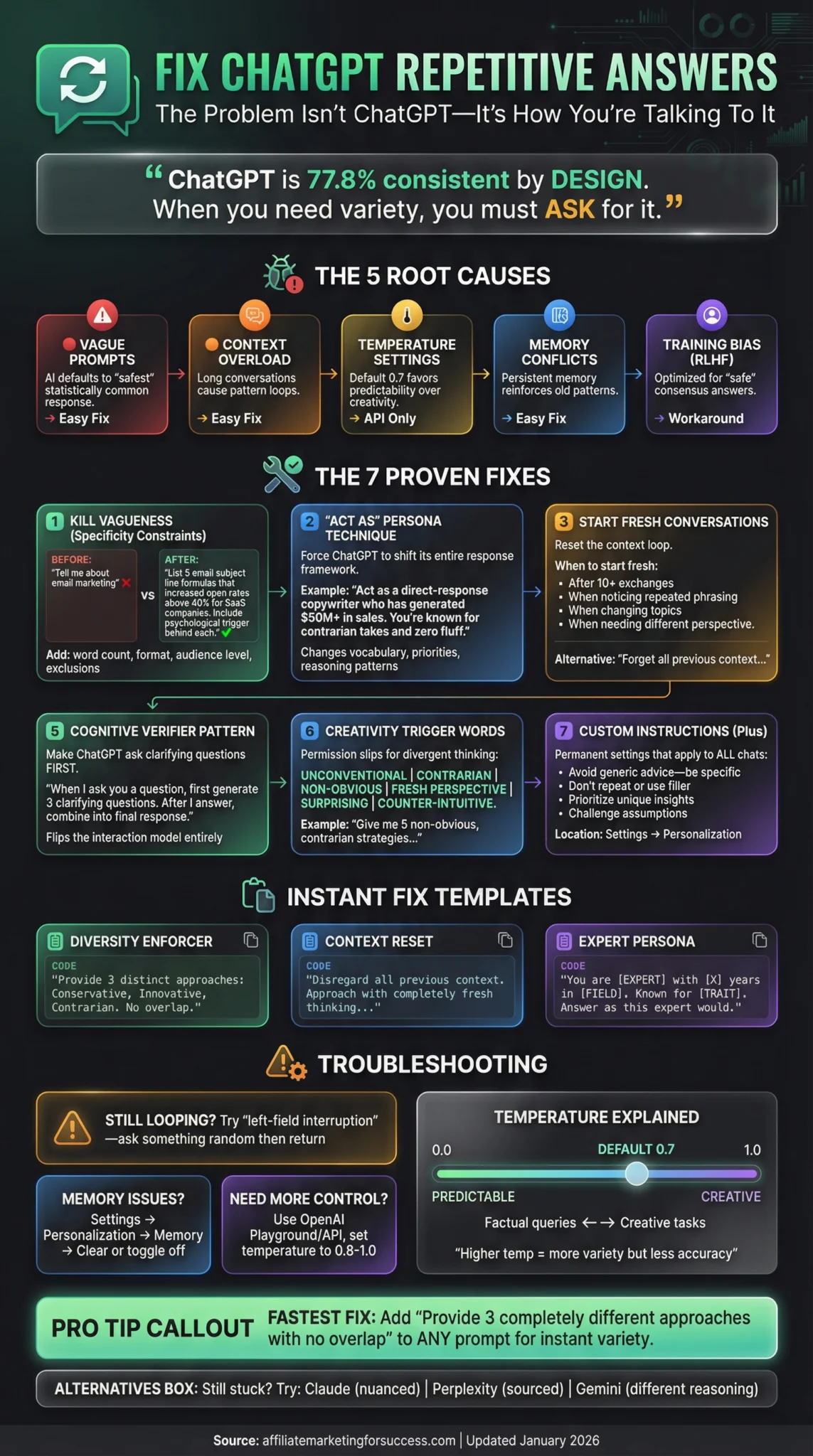
Let’s cut through the noise. ChatGPT giving repetitive, same-sounding answers isn’t random. According to research on response consistency, ChatGPT 4 correctly answered questions consistently 77.8% of the time across multiple attempts—which means it’s designed to be consistent. The problem? Sometimes you need variety, not consistency.
Understanding how ChatGPT actually processes your prompts is the first step to breaking the repetition cycle.
7 Proven Fixes to Get Unique, Non-Repetitive ChatGPT Answers
Stop fighting the tool. Start working with how it actually functions. These aren’t theories—they’re battle-tested techniques used by prompt engineering professionals who get paid to extract maximum value from AI.
1
Use Specificity Constraints (Kill Vagueness)
The #1 reason for generic answers? Generic prompts. When you ask “Tell me about AI tools,” you get a Wikipedia-style response. ChatGPT doesn’t know what you actually need.
❌ BEFORE (Vague)
“Tell me about email marketing”
✓ AFTER (Specific)
“List 5 email subject line formulas that increased open rates above 40% for SaaS companies in 2026. Include the psychological trigger behind each.”
Pro Tip: Add constraints like word count, format requirements, audience level, and specific exclusions (“Don’t include basic tips everyone knows”).
2
Deploy the “Act As” Persona Technique
This technique forces ChatGPT to shift its entire response framework. Instead of answering as a “helpful AI assistant” (its default persona), you assign a specific role that changes its vocabulary, priorities, and reasoning patterns.
Example Prompt
Act as a direct-response copywriter who has generated $50M+ in sales. You’re known for contrarian takes and zero fluff. Analyze this landing page and give me 5 brutal, specific improvements that would increase conversions. Don’t be nice—be useful.
The persona shifts the entire response. Master more prompt engineering examples to unlock this technique’s full potential.
3
Start Fresh Conversations (Reset the Loop)
Long conversations create what users call “context poisoning.” ChatGPT tries to maintain consistency with everything it said before—even when that’s not what you want. Research shows significant response variation can occur just by changing the conversation context.
When to Start Fresh:
- After 10+ back-and-forth exchanges
- When you notice repeated phrasing
- When changing topics significantly
- When you need a fundamentally different perspective
Alternative: Use the command “Forget all previous context and approach this with completely fresh thinking” before your new prompt.
4
Force Multiple Distinct Outputs
This is the easiest instant fix. Instead of asking for one answer, explicitly request multiple different approaches. ChatGPT is forced to diversify.
Magic Phrase to Add
“Provide 3 completely different approaches. Each should use a different framework, tone, and angle. Label them as Conservative, Moderate, and Bold.”
🎯 Conservative
Safe, proven approach
⚖️ Moderate
Balanced, practical
🚀 Bold
Unconventional, high-risk
5
Use the Cognitive Verifier Pattern
Instead of ChatGPT guessing what you need, make it ask clarifying questions first. This dramatically improves response relevance and reduces the “default safe answer” problem.
Pattern Template
“When I ask you a question, first generate 3 clarifying questions that would help you give a more accurate, specific answer. After I answer those, combine everything into your final response.”
This is one of the advanced patterns covered in resources on learning prompt engineering. It flips the interaction model entirely.
6
Add Creativity Trigger Words
Specific words signal to ChatGPT that you want divergent, creative thinking rather than safe consensus answers. These act as “permission slips” for the AI to break from templated responses.
Contrarian
Non-obvious
Fresh perspective
Surprising
Counter-intuitive
Unique
Non-repetitive
Example: “Give me 5 non-obvious, contrarian strategies for email marketing that most experts would disagree with.”
7
Configure Custom Instructions (ChatGPT Plus)
If you’re on ChatGPT Plus, Custom Instructions are your secret weapon. They apply to every conversation automatically, ensuring you never get default generic responses.
Recommended Custom Instructions
- Avoid generic advice. Be specific and actionable.
- Don’t repeat yourself or use filler phrases.
- Prioritize unique insights over safe consensus answers.
- If I ask for multiple options, make each one genuinely different.
- Challenge assumptions when relevant.
Where to find it: Settings → Personalization → Custom Instructions
Copy-Paste Prompt Templates That Eliminate Repetition
Stop reinventing the wheel. Here are battle-tested templates you can use immediately. For more inspiration, explore this collection of awesome ChatGPT prompts for every use case.
🎯 Template 1: Diversity Enforcer
I need [X] on [TOPIC]. Provide 3 completely distinct approaches:
1. The CONSERVATIVE approach (safe, proven)
2. The INNOVATIVE approach (creative, cutting-edge)
3. The CONTRARIAN approach (challenges conventional wisdom)
Each must use different frameworks, examples, and reasoning. No overlap.
🔄 Template 2: Context Reset
Disregard all previous context in this conversation. Approach the following question as if this is the first message you’ve ever received from me:
[YOUR QUESTION]
Provide a fresh, original perspective without referencing any previous patterns.
🎭 Template 3: Expert Persona Switch
You are [SPECIFIC EXPERT TYPE] with [X] years of experience in [FIELD]. You’re known for [SPECIFIC TRAIT: contrarian views/practical advice/deep technical knowledge].
Given your expertise, answer this: [QUESTION]
Respond as this expert would—with their vocabulary, priorities, and reasoning style. Avoid generic AI-assistant tone.
Troubleshooting: When Fixes Don’t Work
🔁
Still Looping After Reset?
Try the “left-field interruption” technique: Ask something completely unrelated (“What is a chair?”) then return to your original question. This breaks the pattern-matching loop.
Source: Reddit community workaround
📝
Memory Feature Causing Issues?
Go to Settings → Personalization → Memory and either clear specific memories or turn it off temporarily. Memory can reinforce previous response patterns across sessions.
Note: ChatGPT Plus feature only
⚙️
Need More Control?
Use the OpenAI Playground or API where you can directly adjust the “temperature” parameter. Higher values (0.8-1.0) produce more creative, varied outputs.
Recommended: Temperature 0.8 for creative tasks
❓ Frequently Asked Questions
📚 Sources & References
Research and official resources referenced in this article:
- ChatGPT’s Response Consistency: A Study on Repeated Queries of Medical Examination Questions
NIH/PMC – Research on ChatGPT accuracy and consistency rates - ChatGPT Release Notes — OpenAI Help Center
Official OpenAI documentation on feature updates and improvements - How is ChatGPT’s Behavior Changing Over Time?
Harvard Data Science Review – Analysis of ChatGPT behavior changes - 5 Advanced Prompts for ChatGPT to Boost Answers
Descript – Advanced prompt engineering techniques - An Analysis of ChatGPT Response Variations to Identical Prompts Across Different Devices
VocaTech Journal – Research on response variation factors
Written By
Alexios Papaioannou
Digital marketing strategist and AI tools specialist with hands-on experience helping affiliate marketers leverage ChatGPT for content creation, SEO, and conversion optimization. 7 Top SEO Content Optimization Tools
Last Updated: January 13, 2026
Our Editorial Standards:
- All claims verified against official sources and peer-reviewed research
- Techniques tested by the author before publication
- No paid placements or sponsored recommendations
- Regular updates to reflect the latest ChatGPT changes

Alexios Papaioannou is the founder and lead editor of Affiliate Marketing for Success. He focuses on affiliate marketing systems, SEO, content strategy, monetization design, and the impact of AI-driven search on publishers. Editorial background, disclosure standards, and correction policy are documented on the site’s About Alexios and Editorial Policy pages.