How to Build an Affiliate Marketing Website: A 10-Step Guide
Short answer: an affiliate website is a site that helps people make a buying decision and earns a commission when they buy through its links. To build one, pick a niche narrow enough to cover thoroughly, set up a lean WordPress site, publish the trust pages before the first review, write supporting how-to content before money pages, label every affiliate link, and track which pages actually send buyers. The steps below walk through each decision with one worked example.
The example used throughout is a hypothetical site called Quiet Desk, about audio gear for people who work from home: headsets, USB microphones, and acoustic treatment. It is invented for illustration. The point is to show how each decision looks in practice, not to recommend that niche.
What you are actually building
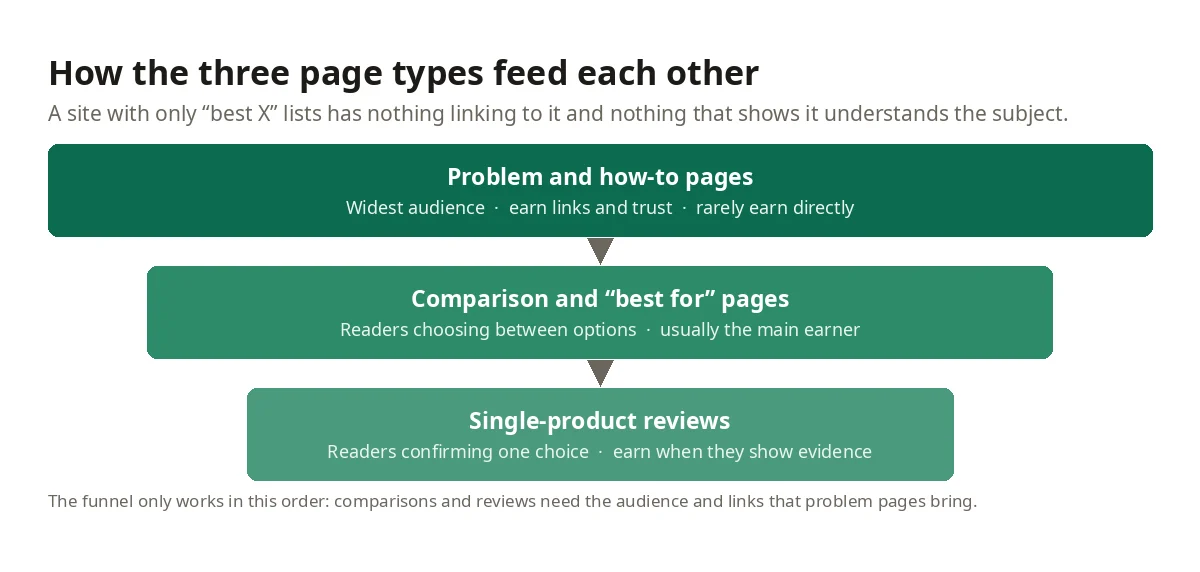
Most profitable affiliate sites are built from three kinds of pages, and the mix matters more than the total count:
| Page type | Reader’s situation | Quiet Desk example | Earns directly? |
|---|---|---|---|
| Problem and how-to | Has a problem, hasn’t picked a solution | “Why do I sound echoey on Zoom?” | Rarely, but it feeds the other two |
| Comparison and “best for” | Knows the solution type, choosing between options | “Best USB microphones for video calls” | Yes, usually the main earner |
| Single-product review | Has a shortlist, wants to confirm one choice | “[Microphone model] review: is it worth it for calls?” | Yes, if it shows real evidence |
Problem pages bring the widest audience and earn the links and trust that the comparison and review pages need. A site with only “best X” lists has nothing to link from and nothing that shows it understands the subject.
Step 1: Choose a niche you can cover 50 times
A niche works for an affiliate site when three things are true: there are enough distinct questions to fill a site, there are products people buy to solve them, and you can add something a reader can’t get from the manufacturer’s page.
Run this test before you register a domain:
- Write down 50 questions your reader would type into a search box. For Quiet Desk: “headset vs speakers for calls”, “do acoustic panels work in a small room”, “best mic arm for a small desk”, “why does my mic pick up keyboard noise”. If you stall at 15, the niche is too narrow or you don’t know it well enough yet.
- Check that merchants pay for it. Look for brand affiliate programs (search “[brand] affiliate program”), the big networks (Awin, Impact, CJ), and retailer programs such as Amazon Associates. You want several merchants, not one.
- Decide what you’ll add. Hands-on use, recordings, measurements, photos, long-term ownership notes, or rigorous comparison of published specs. If the honest answer is “nothing”, pick another niche.
| Criterion | Question to answer | Quiet Desk |
|---|---|---|
| Depth | Can you list 50+ distinct questions? | Yes: rooms, mics, headsets, software, cables |
| Purchase intent | Do the questions lead to products? | Yes, most problems end in a purchase |
| Merchant spread | At least 3 programs you could join? | Retailers plus several audio brands |
| Your edge | What evidence can you show? | Recorded samples from each mic in the same room |
| Durability | Will this still matter in 3 years? | Remote work and video calls are not going away |
For more niche ideas with the same filter applied, see our niche list and niche affiliate programs for bloggers.
Check demand before you spend money
The 50-question test proves you know the niche. It doesn’t prove anyone is searching for it. Before you buy a domain, spend an afternoon checking:
- Search your questions and look at who ranks. If the top results are manufacturer pages with no real testing, or thin articles that don’t answer the question, there’s an opening. If the top five are thorough, well-tested guides from established sites, you’ll need a narrower angle — not a head-on fight.
- Read “People also ask” boxes. They show the follow-up questions real searchers ask, and they’re free topic ideas.
- Listen where readers ask. Forums, Reddit, and product-review comments show the exact words people use — and the problems nobody has answered well yet. For Quiet Desk, that’s where “mic picks up keyboard noise” shows up as a real complaint, not a keyword guess.
- Check that people buy. Retailer bestseller lists and the sheer number of products in the niche tell you whether money changes hands. A niche with passionate readers and nothing to buy is a hobby, not a business.
If demand looks thin, narrow the niche rather than abandoning it. “Audio for home workers” is broad; “microphones for video calls in small rooms” is a beachhead you can actually win — and widen later.
Step 2: Domain and hosting
Domain. Choose a short, brandable name over an exact-match keyword. “Quiet Desk” can grow into lighting, chairs, or desks; “bestusbmicrophones.com” cannot, and it reads like a thin affiliate site to readers. Prefer .com where it is available, avoid hyphens and numbers, and check the name isn’t a trademark of a brand you’ll review.
Hosting. You don’t need expensive hosting at launch, but you do need these five things:
- Automatic daily backups you can restore yourself.
- Free SSL (HTTPS) that renews automatically.
- A staging copy, so plugin and theme updates can be tested before they reach the live site.
- Server-level page caching, or support for a single caching plugin.
- A current, supported PHP version.
Our WordPress hosting comparison for affiliate sites covers specific hosts against these criteria.
What it costs
An affiliate site is cheap to start, and the costs are almost all time. As a rough guide: a .com domain is typically $10–15 a year, and basic shared hosting is a few dollars a month — under $100–150 for the first year all-in at the lean end. Prices change, so check before you buy, and don’t pay for anything beyond domain and hosting until the site earns. A premium theme is a one-time cost and optional; most email tools have a free tier to start with. The expensive part is the 20 articles, and you pay for those in hours, not money.
Step 3: Set up WordPress without bloat
WordPress is the default for affiliate sites because it is free, flexible, and every SEO and tracking tool supports it. The common failure isn’t the platform. It’s installing 40 plugins in the first week.
Settings to change on day one:
- Permalinks: Settings → Permalinks → “Post name”, so URLs read
/best-usb-microphones-for-calls/. Decide this before publishing; changing it later means redirects. - Search engine visibility: make sure “Discourage search engines from indexing this site” is unticked before launch.
- Site title, tagline, timezone and admin email.
- Comments: turn them off unless you’ll moderate them. Unmoderated comments become spam that sits on your pages.
A sensible starting set is a lightweight theme and one plugin for each of these jobs, and no more:
| Job | Why you need it | Rule |
|---|---|---|
| SEO | Titles, meta descriptions, XML sitemap, canonical tags | One SEO plugin only |
| Caching and performance | Fast pages on cheap hosting | One caching plugin only; two will conflict |
| Backups | Recovery from a bad update or a hack | Store copies off the server |
| Security | Login protection, updates | Enable two-factor login for admins |
| Forms | Contact page | Add spam protection |
After any change to caching or optimisation settings, open your key pages logged out and check them. Minification and “optimisation” features can quietly break layouts or scripts, and logged-in admins often see an uncached version that hides the problem.
WordPress or something else?
WordPress is the default in this guide because it fits affiliate sites best, but it’s worth knowing the alternatives:
| Option | Strengths | Weaknesses |
|---|---|---|
| WordPress (self-hosted) | You own the site and the data; every SEO, tracking, and affiliate tool supports it; thousands of themes and plugins | You maintain updates, backups, and security yourself |
| All-in-one website builders | Fast to start; hosting and security handled for you | Less control over SEO and performance; harder to move away later; monthly cost never stops |
| Static site generators | Very fast pages; cheap hosting; hard to hack | Needs technical comfort; adding features takes work |
If you’re unsure, choose WordPress. It’s the easiest to fix later, and the most help exists for it.
Step 4: Publish the trust pages first
Before the first affiliate link goes live, the site needs pages that tell a reader who is behind it and how it makes money. Readers look for them, affiliate programs check for them during approval, and they cost an afternoon.
| Page | What it must say |
|---|---|
| About | Who writes the site, what experience they have with the subject, and why the site exists. A real name and photo help. |
| Affiliate disclosure | That the site earns commissions, which programs it uses, and that this doesn’t change the price the reader pays. See disclosure examples. |
| How we test or review | What “tested” means on this site, and what you do when you haven’t used a product. Ours is our review methodology. |
| Contact | A working way to reach you. Many programs require it. |
| Privacy policy | What analytics and cookies you use. Required for most analytics and ad tools. |
Step 5: Plan the structure before the content
Group content the way readers make decisions, not the way products are catalogued. Each category gets a hub page that explains the topic and links to everything in it.
Quiet Desk, planned before writing a word:
- /microphones/ (hub): how to choose a mic for calls; USB vs XLR; best USB mics for calls; individual mic reviews
- /headsets/ (hub): headset vs earbuds for calls; best headsets with good mics; reviews
- /room-acoustics/ (hub): why calls sound echoey; do foam panels work; DIY treatment; best panels for small rooms
Three hubs is enough to start. Each new article should fit an existing hub. If it doesn’t, either the article is off-topic or you’ve found the next hub.
Step 6: Your first 20 articles
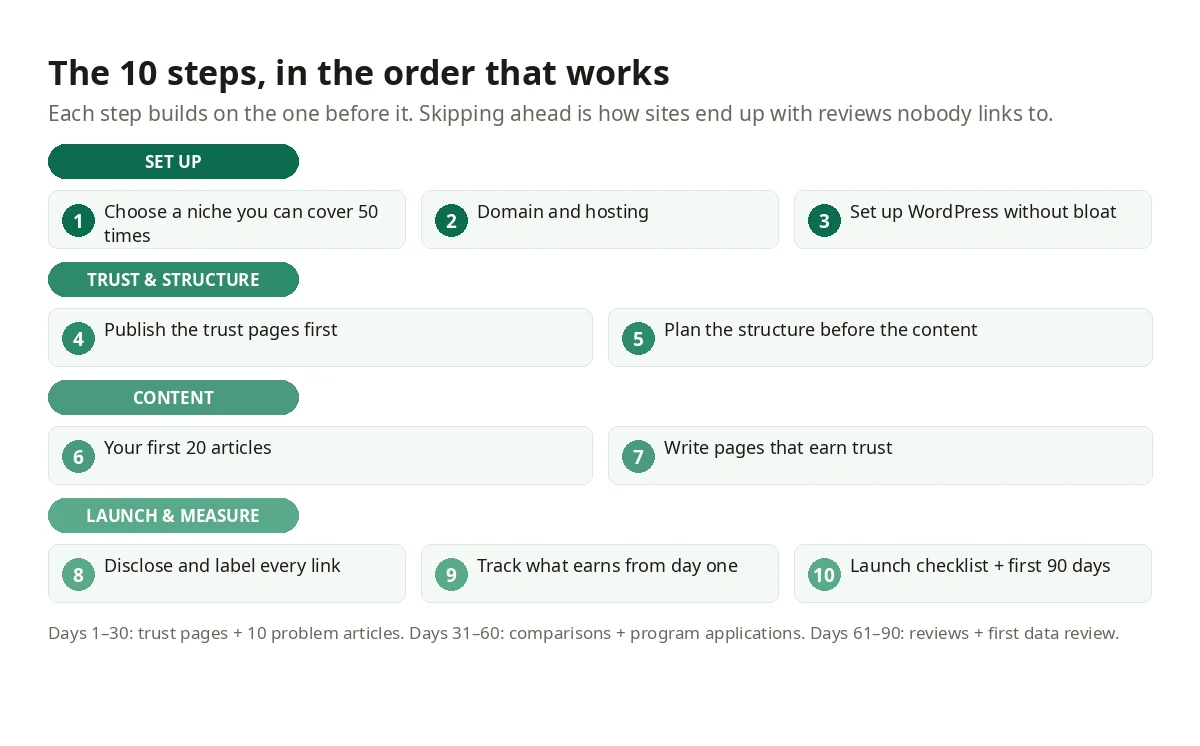
Publish in an order that builds internal links: problems first, then comparisons that link back to them, then reviews that the comparisons link to.
| Batch | Count | Quiet Desk examples |
|---|---|---|
| 1. Problems and how-tos | 10 | Fix echo on calls; reduce keyboard noise; mic placement for video; headset vs speakers |
| 2. Comparisons and “best for” | 6 | Best USB mics for calls; best headsets under a set budget; best panels for small rooms |
| 3. Reviews | 4 | Only for products you have used or can evidence properly |
Our list of first 10 affiliate blog posts goes deeper on choosing these.
Write a brief before you write the article
Every article should start with five lines, written before the draft. It takes five minutes and stops most weak pages:
| Brief line | Example (Quiet Desk) |
|---|---|
| The question, in the reader’s words | “Why do I sound echoey on Zoom?” |
| The answer, in one sentence | Hard surfaces reflect sound; soft treatment near the mic fixes most of it |
| The evidence you’ll show | Before/after recordings in the same room |
| Products involved, if any | Two acoustic panel sets, with prices from Amazon-served links |
| Where it links | To the room-acoustics hub and the best-panels comparison |
If you can’t fill in the evidence line, the article isn’t ready to write. Research first, or pick a different question.
Step 7: Write pages that earn trust
Google’s guidance on writing high-quality reviews describes what search engines reward, and it matches what readers want. In practice, every comparison or review should include:
- The answer first. Your pick and who it suits, in the first paragraph.
- How you know. One sentence on your evidence: “We recorded each microphone in the same untreated 3 × 3 m room” or “We haven’t used this model; this comparison is based on published specifications and verified owner reports.”
- Evidence a reader can check. Recordings, photos of the product in use, measurements, screenshots.
- Who it’s not for. Every product has a buyer it’s wrong for. Saying so is the strongest trust signal on the page.
- Alternatives. What to buy instead, and why.
Never write “we tested” for something you didn’t. The FTC treats a false claim of personal use as a deceptive endorsement, and readers notice when a “hands-on” review contains nothing a hands-on reviewer would know.
Step 8: Disclose and label every affiliate link
Two separate rules apply, and new sites often handle only one of them.
Tell readers. The FTC’s Endorsement Guides require a clear and conspicuous disclosure of the commercial relationship, placed where readers will see it before they act, which means near the recommendation, not only in the footer. One short line at the top of each page works: “We earn a commission if you buy through links on this page, at no extra cost to you.” Amazon Associates also requires its own statement: “As an Amazon Associate I earn from qualifying purchases.”
Tell search engines. Google asks that affiliate links carry rel="sponsored" (or rel="nofollow"), as explained in its guide to qualifying outbound links. Most link-management plugins can add this automatically.
Step 9: Track what earns from day one
You can’t improve a site if you don’t know which pages send buyers. Set up four things before launch:
- Google Search Console and Bing Webmaster Tools. Both are free and show which queries your pages appear for. Submit your XML sitemap to both. Bing powers more searches than many site owners expect, including some AI assistants’ web results.
- Analytics with an outbound-click event. Count clicks on affiliate links per page.
- Sub-IDs (tracking IDs) per page where your networks support them, so commission reports tell you which article made the sale.
- A simple monthly sheet: page, sessions, affiliate clicks, sales, commission.
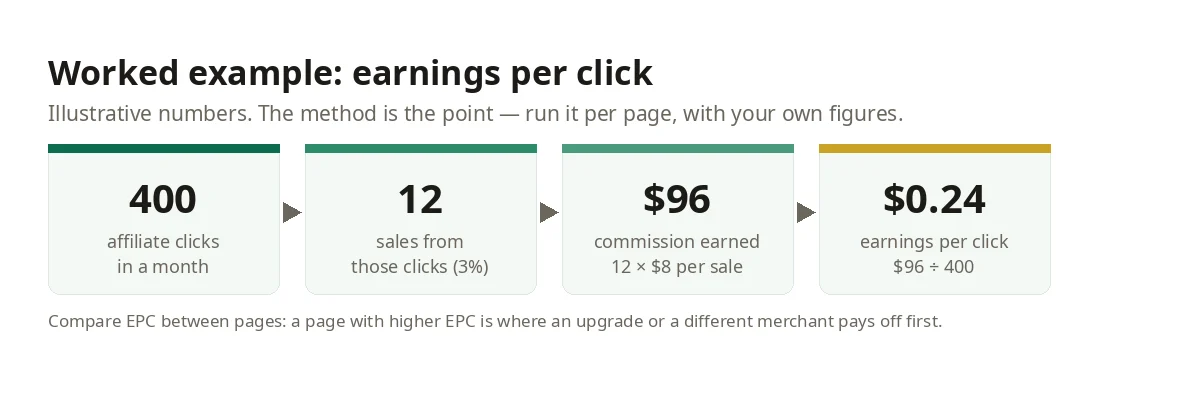
From that sheet, work out earnings per click (EPC) for each page. A worked example with made-up numbers: a comparison page sends 400 affiliate clicks in a month, which produce 12 sales at an average commission of $8. That’s $96, so the page’s EPC is $96 ÷ 400 = $0.24. Comparing EPC between pages tells you where an upgrade or a different merchant will pay off.
One more number to know before you judge a page: the attribution window — how long after a click a sale still counts. Amazon’s is short: a sale counts only if the customer adds the product to their cart within 24 hours of clicking your link, and they then have up to 89 days to complete that order (per Amazon’s program policies). The product must also be shipped and paid for within 180 days of the purchase, which is a different figure from the 180-day new-account window. Other programs set their own windows, so check each one before you build content around it.
If Google isn’t indexing your pages
New sites wait. But if pages sit unindexed for weeks, check these before assuming it’s a penalty:
- Search Console’s Page indexing report (and URL Inspection for a single page): is the page discovered, crawled, or excluded — and for what reason? Fix the reason it gives you, not the one you guess.
- Sitemap submitted: to Google Search Console and Bing Webmaster Tools, and the page actually in it.
- No accidental noindex: “Discourage search engines from indexing this site” unticked (Step 3), and no noindex tag on the page itself.
- Internal links: every page needs links from other pages on your site. An orphaned page is easy for crawlers to miss.
- Patience: a new site with no links pointing to it from elsewhere is discovered slowly. Publishing consistently and earning even a few genuine links matters more than resubmitting the sitemap daily.
If nobody clicks: the usual cause is a title that doesn’t match the search, or a page answering a different question than the one people asked. Search the query yourself, read the top results, and compare what they promise with what your page delivers.
Step 10: Launch checklist and the first 90 days
Before you tell anyone the site exists:
- All trust pages are published and linked in the footer.
- Every affiliate link has a disclosure nearby and
rel="sponsored". - The sitemap is submitted to Google Search Console and Bing Webmaster Tools.
- Pages load quickly on a phone, checked logged out.
- A backup has been made and a restore has been tested once.
| Period | Focus | Done when |
|---|---|---|
| Days 1–30 | Trust pages and the 10 problem articles | Every article fits a hub and links to at least two others |
| Days 31–60 | 6 comparisons; apply to affiliate programs | At least 3 programs approved; links labelled |
| Days 61–90 | 4 reviews; first data review | You know which pages get impressions and clicks |
Months 4–12: what changes
After the first 90 days, the work shifts from building to improving:
- Refresh the winners. Pages that already get impressions get updated before new articles get written — new evidence, current prices, better tables.
- Add email capture. A simple signup on your best how-to pages turns one-time search visitors into repeat readers. Even a small list changes what you can promote.
- Apply to more programs. With traffic and sales history, programs that rejected a brand-new site will often approve you now.
- Review income quarterly. Which pages earn, which merchants pay best, and where the next upgrade goes. Drop what doesn’t work; double down on what does.
The early months are the hardest stretch: the work is heavy and the income is close to zero. Plan for it, and keep publishing through it.
Some programs, Amazon Associates among them, don’t fully approve a new site until it has referred sales. Amazon only reviews a new application once it has driven at least three qualifying sales within the first 180 days, and your own orders don’t count. Its Application Review Process page also asks for robust original content (at least 10 posts as a rule of thumb) that is recent, generally within the last 60 days. Miss the window and you can apply again once the site is established. Apply once you have content and some traffic, not on day one. Our Amazon Associates approval checklist and application template help here.
Common mistakes when building the site
- Too broad a niche. “Technology” can’t be covered well by one person; “audio for home workers” can.
- Money pages first. Reviews with no supporting content have nothing linking to them and nothing showing expertise.
- Plugin pile-ups. Two caching or two SEO plugins cause more problems than they solve.
- Claiming testing you didn’t do. It’s a legal risk and a credibility one.
The full list, with a fix for each, is in 12 affiliate marketing mistakes and how to fix them. When the site is built, turn it into a strategy and use the content upgrade checklist on pages that start getting impressions.
FAQ
Do I need a website to do affiliate marketing?
No. You can promote affiliate products through YouTube, email, or social platforms, as covered in affiliate marketing with no audience. A website is the channel you control most fully, which is why many affiliates build one alongside other channels.
How long until an affiliate website makes money?
There’s no reliable average. It depends on the niche, competition, how much you publish, and whether search engines index and rank the site. Plan for months of publishing before meaningful income, and judge progress by impressions and affiliate clicks first, because they move before revenue does.
How many articles does a new affiliate site need?
Enough to cover one topic properly. Twenty well-linked articles in three clear hubs usually beats a hundred loosely related posts. Depth on a narrow topic is what makes a small site credible.
Can I use AI to write the content?
AI can help with outlines, drafts, and editing, but it can’t supply what makes an affiliate page worth reading: your evidence, your judgement, and your experience with the products. Search engines judge the result, not the tool. Our policy is on the how we use AI page.
How much does it cost to start an affiliate website?
Roughly $100–150 for the first year at the lean end, covering a domain and basic hosting; everything else has a free option to start with. The real cost is your time. The breakdown is in What it costs, above.
Do I need to know how to code?
No. WordPress plus a lightweight theme covers everything in this guide, and most tasks are point-and-click. Basic HTML helps when something looks wrong in the editor, but it’s a skill you pick up as you go, not a prerequisite.
How does Amazon Associates approve new sites?
Only after you’ve driven at least three qualifying sales within the first 180 days; your own orders don’t count. Amazon also checks for at least 10 original, recent posts. The full rules are on Amazon’s Application Review Process page, and Months 4–12 above covers what to do if you miss the window.