
How to Update Old Blog Content for SEO (2025 Guide)
Quick Answer
How to Update Old Blog Content for SEO & Affiliate Conversions…: prioritize one growth lever per week, measure conversion impact, and expand only proven winners.
Here’s a brutal truth most bloggers ignore: your old content is probably killing your rankings right now.
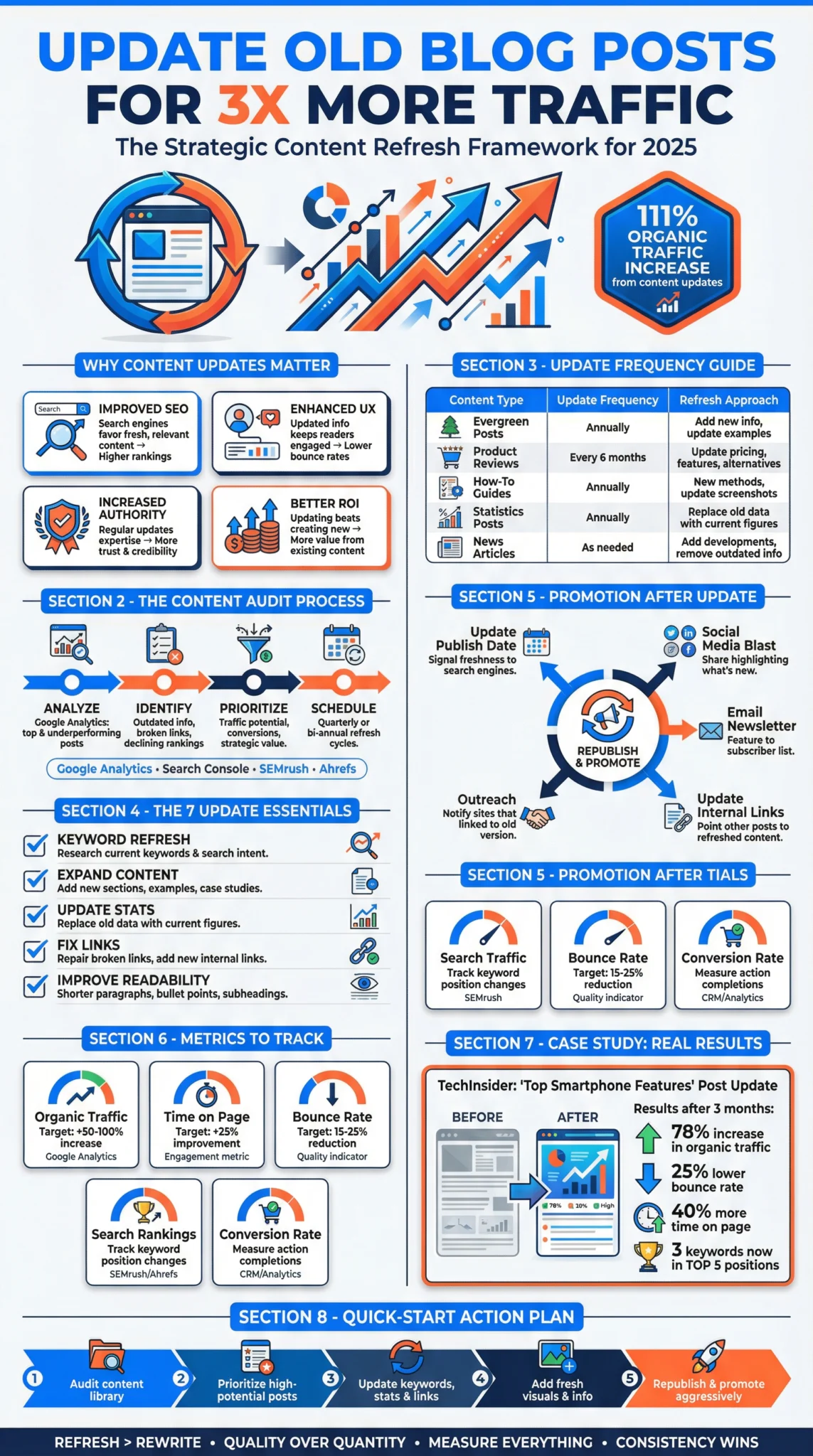
While you’re grinding out new posts every week, your competitors are quietly updating their existing content—and stealing your traffic. The data is clear: refreshed content can see traffic increases of 100-400%, often within weeks.
The good news? You’re sitting on a goldmine. This guide shows you exactly how to update old blog content the right way—no fluff, no theory, just the step-by-step system that works in 2026.
⚡
Quick Summary: Update Old Blog Content in 7 Steps
- Audit your content library using Google Search Console data
- Prioritize posts with declining traffic but ranking potential
- Research current search intent and competitor gaps
- Update information, stats, and examples for 2026
- Optimize on-page SEO (title, headings, internal links)
- Improve readability and add missing content sections
- Republish with updated date and promote strategically
✓ This Guide Is For You If:
- You have 20+ blog posts collecting dust
- Your organic traffic has plateaued or declined
- You want faster results than publishing new content
✗ Skip This If:
- You have fewer than 10 published posts
- Your blog is less than 6 months old
- You’re not tracking traffic with analytics
What You’ll Need Before Starting
🛠️ Required Tools (Free)
- Google Search Console (connected to your site)
- Google Analytics 4
- Spreadsheet software (Google Sheets works great)
- Your WordPress/CMS login
💡 Optional (But Helpful)
- SEO tool (Ahrefs, Semrush, or Ubersuggest)
- Grammarly or Hemingway Editor
- Canva for updated graphics
- Screaming Frog for larger sites
⏱️ Time Investment
- Content audit: 1-3 hours (one-time)
- Per post update: 45-90 minutes
- Results timeline: 2-8 weeks per post
Why Updating Old Blog Content Works (The Data)

Before we dive into the how, let’s address the why. Because if you’re skeptical about spending time on old posts instead of creating new ones, you need to see what’s at stake.
📊 What the Research Shows:
- According to HubSpot’s internal data, updating old posts can increase organic traffic by up to 106%
- Backlinko reports that comprehensive content updates often recover lost rankings within 4-8 weeks
- Content freshness is a confirmed Google ranking factor, particularly for time-sensitive queries
- Based on industry reports, 76% of monthly blog views typically come from “old” posts (published more than a month ago)
Here’s the reality: creating new content is expensive. Whether you’re writing yourself or paying writers, each new post requires research, writing, editing, graphics, and promotion. Updating an existing post? You’re building on work that’s already done.
Even better: old posts often have existing backlinks, social shares, and domain authority you can leverage. A strategic update can transform a page-two article into a page-one winner—often faster than a brand-new post could rank.
Understanding the key Google ranking factors makes content updates even more effective because you’ll know exactly what signals to strengthen.
How to Update Old Blog Content: Step-by-Step Process
Follow these 7 steps in order for best results.
Audit Your Content Library
You can’t improve what you don’t measure. Start by exporting your blog data to see what’s actually happening with your content.
How to pull your data:
- Google Search Console: Go to Performance → Search Results → Export (last 16 months)
- Google Analytics: Navigate to Reports → Engagement → Pages and screens → Export
- Create a master spreadsheet with columns: URL, Title, Publish Date, Last Updated, Impressions, Clicks, CTR, Average Position, Organic Sessions
💡 Pro Tip: Compare the current period to the same period last year. Posts with declining traffic are your priority targets—they had proven potential that’s now being lost.
Prioritize Posts Using the Impact Matrix
Not all old content deserves your time. Some posts should be updated, some merged, some redirected, and some deleted entirely. Here’s how to decide:
Focus your energy on “High Priority Update” and “Quick Win” posts first. These have proven ranking potential and will give you the fastest return on your time investment.
Research Current Search Intent & Competitors
Search intent changes over time. What Google wanted to rank in 2026 may be completely different from what it rewards in 2026. Before touching your content, you need to understand what’s winning right now.
Your research checklist:
- Google the target keyword in an incognito window
- Analyze the top 5 results: What format are they using? (listicle, how-to, comparison?) How long are they? What subtopics do they cover?
- Check “People Also Ask” for questions your content should answer
- Review “Related Searches” at the bottom for semantic keywords
- Note content gaps: What are competitors missing that you could add?
This research is non-negotiable. Many bloggers skip it and wonder why their updates don’t work. If your content doesn’t match what Google currently wants, no amount of updating will help.
Strong keyword research fundamentals make this process much faster and more effective.
Update Information, Stats, and Examples
Now we get into the actual content work. Go through your post line by line and update everything that’s outdated:
📅 Dates & Years
- Change “2026” to “2026” where relevant
- Update “this year” references
- Remove dated phrases like “recently”
📊 Statistics & Data
- Find newer studies/reports
- Verify existing stats are still accurate
- Add source citations if missing
🔗 Links & Resources
- Fix broken outbound links
- Replace outdated tool recommendations
- Update pricing information
💡 Examples & Screenshots
- Replace outdated screenshots
- Add current, relevant examples
- Include newer case studies
⚠️ Important: Don’t just change dates superficially. If you update “2026” to “2026” but the advice itself is outdated, readers (and Google) will notice. Every update should genuinely improve accuracy.
Optimize On-Page SEO Elements
Your on-page SEO is where quick wins live. Often, a simple title change can dramatically improve click-through rates and rankings.
On-page optimization checklist:
- Title tag: Include target keyword + current year + compelling hook (under 60 characters)
- Meta description: Clear value proposition with call-to-action (under 155 characters)
- H1 heading: Should match title tag intent, include primary keyword
- H2/H3 structure: Use keyword variations and address user questions
- Image alt text: Descriptive, keyword-relevant where natural
- URL: Generally don’t change (to preserve backlinks), but ensure it’s clean
✓ Quick Win: Check your GSC data for keywords you’re ranking positions 8-15 with high impressions but low clicks. Adding these to your H2s and content body can push you onto page one.
Improve Readability & Add Missing Sections
Google increasingly rewards content that provides a great user experience. An update is your chance to make old content actually enjoyable to read.
Readability improvements:
- Break up long paragraphs (aim for 2-4 sentences max)
- Add bullet points and numbered lists
- Include a table of contents for longer posts
- Add relevant images, charts, or infographics
- Use bold text for key takeaways
- Eliminate fluff and filler sentences
Content sections to consider adding:
- FAQ section: Answer “People Also Ask” questions from Google
- Quick summary/TL;DR: Give scanners what they need upfront
- Comparison tables: If relevant to your topic
- Expert quotes: Add credibility with industry voices
- Internal links: Connect to your other relevant content
When updating content that’s meant to stand the test of time, consider how to create evergreen content that won’t need constant refreshes.
Republish and Promote Strategically
Here’s where many bloggers leave money on the table. They update the content but don’t tell anyone about it. An updated post deserves the same promotion as a new post—sometimes more.
Republishing best practices:
- Update the publish date in WordPress to today (this is legitimate if you’ve made substantial changes)
- Keep the same URL—don’t create a new post or you’ll lose existing backlinks and authority
- Submit to Google Search Console using the URL Inspection tool → Request Indexing
- Share on social media as if it were new content
- Send to your email list (your most engaged audience wants your best content)
- Update internal links on other posts to point to your refreshed content
💡 Pro Tip: Create a “content update” swipe file for social media. Something like: “I just completely overhauled my guide to [topic]—added [X new sections], updated all the stats for 2026, and fixed the things that weren’t working. Fresh link in bio.”
Pro Tips: Advanced Content Update Strategies
Once you’ve mastered the basics, these advanced tactics can multiply your results:
🎯
Target Featured Snippets
When updating, format sections specifically for featured snippets. Use definition paragraphs (40-60 words), numbered lists, and tables. Check what format currently holds the snippet and match it.
📊
Add Original Data
Nothing beats original research for earning backlinks. Add a small survey, analyze your own data, or compile industry statistics. Even a simple poll of your email list creates citable data.
🔄
Content Consolidation
If you have multiple thin posts on related topics, merge them into one comprehensive guide. Redirect the old URLs to the new mega-post. This concentrates authority and eliminates keyword cannibalization.
⏰
Schedule Regular Audits
Set a quarterly calendar reminder to review your top 20 posts. Prevention beats cure—catching declining content early is easier than recovering from a traffic crash.
Content updates are most powerful when they’re part of a winning content strategy that balances new content creation with regular optimization of existing assets.
Common Mistakes to Avoid
- ✗
Changing the URL
This kills your backlinks and existing authority. Always keep the same URL and redirect only if absolutely necessary.
- ✗
Updating Date Without Substance
Changing “2026” to “2026” without real improvements is deceptive and won’t help rankings. Google can tell.
- ✗
Ignoring Search Intent Changes
What ranked in 2026 might not match what Google wants today. Always re-analyze the SERP before updating.
- ✗
Updating Everything at Once
Mass-updating 50 posts simultaneously makes it impossible to measure what worked. Update 3-5 posts, wait, measure, then continue.
- ✗
Forgetting to Promote
Updated content deserves fresh promotion. Share it, email it, submit it to Google. Don’t just publish and hope.
Expected Results & Timeline
Let’s set realistic expectations. Content updates aren’t magic—but they do work consistently when done right.
Realistic expectations: Based on industry case studies, approximately 60-70% of well-executed content updates result in meaningful traffic improvements. Some posts won’t recover—that’s normal. The goal is consistent improvement across your portfolio, not perfection on every post.
For a deeper dive into techniques that specifically target ranking improvements, check out our guide on how to boost the ranking of an existing page on search engines.
❓ Frequently Asked Questions
📚 Sources & References
Official resources and additional reading:
- Google Search Console
Official tool for monitoring your site’s search performance - Google’s Helpful Content Guidelines
Official documentation on what Google considers quality content - HubSpot: Historical Blog Optimization
Case study data on content update results - Backlinko: Content Freshness Guide
In-depth analysis of how Google evaluates content freshness
Written By
Affiliate Marketing for Success Team
Professional bloggers and affiliate marketers with combined experience building and growing content-based businesses since 2026.
Last Updated: January 13, 2026
Our Editorial Standards:
- No paid placements or rankings
- All claims backed by cited sources or clearly stated as experience-based
- All affiliate relationships are clearly disclosed
- Facts are verified against official sources
What tools do I need to update old blog content effectively?
To audit and optimize your content, you need a mix of analytics and SEO tools. Start with Google Search Console for traffic data, then use professional suites like Semrush for competitor analysis or NeuronWriter for semantic optimization. Utilizing the essential tools for a blogger ensures your tech stack supports long-term growth.

Alexios Papaioannou is the founder and lead editor of Affiliate Marketing for Success. He focuses on affiliate marketing systems, SEO, content strategy, monetization design, and the impact of AI-driven search on publishers. Editorial background, disclosure standards, and correction policy are documented on the site’s About Alexios and Editorial Policy pages.