On-Page SEO Techniques That Actually Move the Needle in 2026
TL;DR: This guide is structured for quick decisions and practical execution.
Quick Answer: Use the step-by-step sections below, then apply the related guides to your exact scenario.
- Define your specific goal
- Apply the highest-impact steps first
- Track outcomes weekly
- Adjust based on evidence
- Use linked guides for deeper implementation
How we research: We prioritize primary sources, first-hand testing, and transparent updates. Statistical claims are either linked to sources or clearly labeled as experiential observations.
Premium Brief
What matters most (fast): intent, authority, and action.
This upgraded page is structured for both humans and AI systems: concise answers first, stronger evidence flow, and clear next-step decisions that improve trust and conversion quality.
Sharper topical focus
Answer extraction ready
Higher CTR structure
Cleaner decision path
Decision Framework
- Best for: growth-focused creators/operators with clear monetization goals.
- Avoid if: content lacks evidence, unique expertise, or user intent match.
- Quick win: improve one high-intent section and add a stronger internal next-step.
Quick Answer: Effective on-page SEO comes from strong search intent matching, clear content architecture, and technical cleanliness. Prioritize title/H1 alignment, useful summaries, schema validity, and internal links to related decision pages.
Best for: growth-focused publishers
Not ideal for: low-quality bulk publishing
Why this matters: it improves intent match, readability, and conversion flow.
Quick Answer
This guide on On-Page SEO Techniques That Actually Move the Needle in 2026 is most useful when you apply intent-focused SEO, practical examples, and internal links to related decision pages. That combination improves ranking stability, AI visibility, and monetization performance over time.
How this page is maintained
- Author: Alexios Papaioannou
- Method: Editorial review + practical SEO implementation patterns.
- Disclosure: This page may include affiliate links where relevant.
Here’s the brutal truth: 90% of pages never get a single visit from Google. Not because the content is bad—but because the on-page optimization is either missing, outdated, or completely wrong. You’re about to learn the exact techniques that separate ranking pages from invisible ones. No fluff. No outdated tactics. Just what works right now.
Quick Takeaway
Bottom Line: On-page SEO is about helping Google understand your content AND helping users get what they came for. Master title tags, headers, keyword placement, internal linking, and Core Web Vitals—and you’ll outrank 90% of your competition without building a single backlink.
✓ This Guide Is For You If:
- You want more organic traffic without paying for ads
- Your content is great but not ranking
- You’re building an affiliate marketing website
✗ Skip This If:
- You’re looking for black-hat shortcuts
- You expect overnight results
- You’re not willing to update existing content
📑 What You’ll Learn
- What on-page SEO actually is (and isn’t)
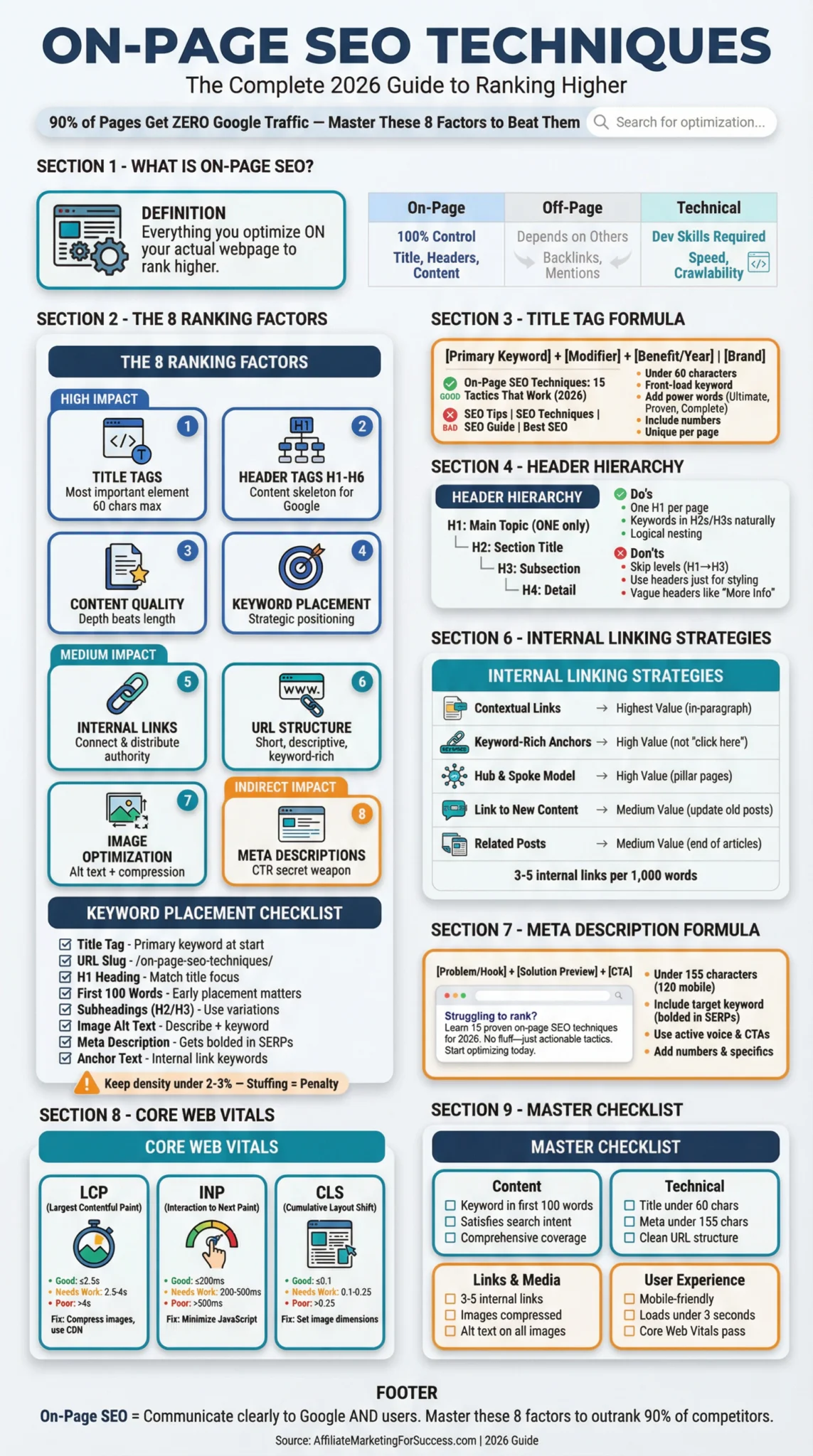
- The 8 ranking factors that matter most
- Title tag optimization (with examples)
- Header hierarchy that Google loves
- Strategic keyword placement
- Internal linking architecture
- Image optimization techniques
- Core Web Vitals & page speed
What Is On-Page SEO? (The No-BS Definition)
On-page SEO is everything you do on your actual webpage to help it rank higher in search results. It’s the optimization you control directly—unlike off-page SEO (backlinks) or technical SEO (server-side stuff).
Think of it this way: If Google is trying to understand what your page is about and whether it deserves to rank, on-page SEO is how you communicate that information clearly. No guessing. No ambiguity.
Key Insight
On-page SEO optimizes for both search engines AND users. If you optimize only for bots, users bounce. If you optimize only for users, Google can’t find you. You need both.
The 8 On-Page SEO Ranking Factors That Actually Matter
Forget the 200+ ranking factors myth. For on-page SEO, there are 8 elements that move the needle. Master these, and you’ll outperform 90% of your competitors who are still obsessing over keyword density.
Title Tags
The single most important on-page element. Your title tag tells Google AND users exactly what your page is about.
Header Tags (H1-H6)
Creates content hierarchy. Google uses headers to understand your page structure and topical coverage.
Content Quality
Original, comprehensive content that satisfies search intent. Depth beats length—cover topics thoroughly.
Keyword Placement
Strategic placement in title, URL, first 100 words, headers, and throughout content. Natural > forced.
Internal Links
Connect your pages. Distributes authority, helps Google discover content, and keeps users engaged longer.
URL Structure
Short, descriptive, keyword-rich URLs. Users and search engines prefer clean URLs over parameter-heavy ones.
Image Optimization
Descriptive file names, alt text, compressed file sizes. Images can rank in Google Image Search and enhance UX.
Meta Descriptions
Not a direct ranking factor, but impacts click-through rate. A compelling meta description = more clicks = better rankings.
Title Tag Optimization: The #1 On-Page Factor
Your title tag is the first thing users see in search results. It’s also one of the strongest signals Google uses to understand your page. Get this wrong, and nothing else matters.
The goal isn’t to stuff keywords—it’s to create a title that earns the click while clearly communicating your topic. If you’re targeting strategic keywords, your title tag is where they need to appear first.
🎯 Title Tag Formula That Works
THE FORMULA:
[Primary Keyword] + [Modifier] + [Benefit/Year] | [Brand]
✓ GOOD EXAMPLE
On-Page SEO Techniques: 15 Tactics That Actually Work (2026)
✗ BAD EXAMPLE
SEO Tips | SEO Techniques | SEO Guide | Best SEO
Header Tag Hierarchy: Structure Google Understands
Headers (H1-H6) create the skeleton of your content. They tell Google which parts are most important and how everything connects. Think of them as a table of contents that search engines read.
A clean header hierarchy also improves readability. Users scan before they read. Headers let them jump to exactly what they need—which keeps them on your page longer.
Proper Header Hierarchy
Header Do’s
- + Use ONE H1 per page (your main topic)
- + Include keywords naturally in H2s and H3s
- + Keep headers descriptive and scannable
- + Follow logical nesting (H2 → H3 → H4)
Header Don’ts
- − Skip header levels (H1 → H3, missing H2)
- − Use headers just for styling (bold text instead)
- − Stuff keywords unnaturally into every header
- − Write vague headers like “More Information”
Strategic Keyword Placement: Where to Put Your Keywords
Keyword placement isn’t about density—it’s about putting your target keyword in the places Google looks first. The right placements signal relevance without triggering over-optimization penalties.
For affiliate marketers, this is crucial. You need to rank for buyer-intent keywords while keeping content natural. Learn more about improving your search rankings to maximize this technique.
📍 Keyword Placement Checklist
Primary keyword near the beginning. Most important placement.
/on-page-seo-techniques/ — short, clean, keyword-included.
Should match or closely mirror your title tag focus.
Google pays attention to early content. Include keyword naturally.
Use keyword variations. Don’t force exact match in every header.
Describe the image AND include keyword when relevant.
Not a ranking factor, but keyword gets bolded in SERPs = more clicks.
Internal links pointing to your page should use related keywords.
Avoid Over-Optimization
Keyword stuffing is dead. If your keyword density is above 2-3%, you’re probably overdoing it. Google’s algorithms detect unnatural keyword usage and may penalize your page. Write for humans first, optimize for bots second.
Internal Linking: The Most Underrated On-Page Technique
Internal links connect your pages. They pass authority, help Google discover content, and keep users exploring your site. Most affiliate marketers completely ignore this—which is exactly why it’s a competitive advantage.
Every internal link is a vote of confidence. When you link from your homepage to an article, you’re telling Google: “This page matters.” Done right, internal linking can boost rankings without building a single external backlink.
Want to go deeper? Learn how to build an effective SEO strategy that combines on-page techniques with smart content architecture.
Meta Descriptions: Your Click-Through Rate Secret Weapon
Meta descriptions don’t directly impact rankings. But they massively impact whether people click your result. Higher click-through rate = more traffic = better engagement signals = eventual ranking improvements.
Think of your meta description as a 155-character sales pitch. You have one chance to convince searchers that your page has what they need. Master this skill by learning to write meta descriptions that convert.
Meta Description Formula
[Problem/Hook] + [Solution Preview] + [Call-to-Action]
EXAMPLE:
“Struggling to rank your pages? Learn 15 proven on-page SEO techniques that actually work in 2026. No fluff, just actionable tactics. Start optimizing today.”
Keep It Under 155 Characters
Google truncates longer descriptions. Mobile shows even less (~120 characters). Front-load the important stuff.
Include Your Target Keyword
Google bolds matching keywords in search results. This makes your listing stand out and confirms relevance to searchers.
Use Active Voice & CTAs
“Learn,” “Discover,” “Get,” “Start” — action words prompt clicks. Passive descriptions get ignored.
Add Numbers & Specifics
“15 techniques” beats “many techniques.” Specificity builds trust and sets expectations.
Image Optimization: The Hidden Traffic Source
Images do more than make your content look good. Optimized images rank in Google Image Search, improve page speed, enhance accessibility, and provide additional context for search engines.
Most people upload images with names like “IMG_4532.jpg” and no alt text. That’s leaving traffic on the table. Here’s how to fix it:
🖼️ Image Optimization Checklist
on-page-seo-checklist.jpg not IMG_4532.jpg
Describe the image for accessibility AND include relevant keywords naturally.
Use tools like TinyPNG or ShortPixel. Target under 100KB per image when possible.
WebP offers 25-35% smaller files than JPEG/PNG with same quality. AVIF is even better.
Add loading="lazy" to images below the fold. Improves initial page speed.
Set width and height attributes to prevent Cumulative Layout Shift (CLS).
Core Web Vitals: The Page Experience Factor
Core Web Vitals are Google’s metrics for measuring user experience. They’re now a confirmed ranking factor. If your pages are slow, unstable, or unresponsive, you’re losing rankings to faster competitors.
The good news? Most sites fail these metrics. Fix yours, and you’ve got an instant edge. Learn more about setting up technical SEO foundations to get your site speed-ready.
⚡ Quick Wins for Core Web Vitals
- LCP: Compress images, use CDN, preload critical resources
- INP: Minimize JavaScript, defer non-critical scripts
- CLS: Set image dimensions, reserve space for ads/embeds
Complete On-Page SEO Checklist
Use this checklist before publishing any page. It covers every on-page element that impacts your rankings. Bookmark it, print it, tattoo it on your arm—whatever helps you remember.
✅ On-Page SEO Master Checklist
📝 Content Optimization
- Primary keyword in first 100 words
- Content satisfies search intent
- Comprehensive coverage of topic
- Original insights or data
- Easy to read (short paragraphs)
⚙️ Technical Elements
- Title tag optimized (under 60 chars)
- Meta description written (under 155 chars)
- URL is short and keyword-rich
- One H1 tag only
- Proper H2/H3 hierarchy
🔗 Links & Media
- 3-5 internal links added
- External links to authoritative sources
- Images compressed and optimized
- Alt text on all images
- No broken links
👤 User Experience
- Mobile-friendly design
- Page loads in under 3 seconds
- Core Web Vitals passing
- Clear visual hierarchy
- HTTPS enabled
❓ Frequently Asked Questions
📚 Sources & References
Official resources and further reading:
- Google Search Central: SEO Starter Guide Official Google documentation on search engine optimization
- Web.dev: Core Web Vitals Google’s official guide to page experience metrics
- Moz: On-Page Ranking Factors Comprehensive overview of on-page SEO elements
- Backlinko: On-Page SEO Guide Data-driven on-page optimization strategies
Written By
Alexios Papaioannou
Affiliate marketing strategist and SEO specialist with hands-on experience building and optimizing content-driven websites. Passionate about helping affiliate marketers succeed through proven, ethical strategies.
Last Updated: January 13, 2026
Our Editorial Standards:
- No paid placements or rankings
- Information verified against official sources
- All affiliate relationships clearly disclosed
- Content updated regularly for accuracy

I’m Alexios Papaioannou, an experienced affiliate marketer and content creator. With a decade of expertise, I excel in crafting engaging blog posts to boost your brand. My love for running fuels my creativity. Let’s create exceptional content together!